
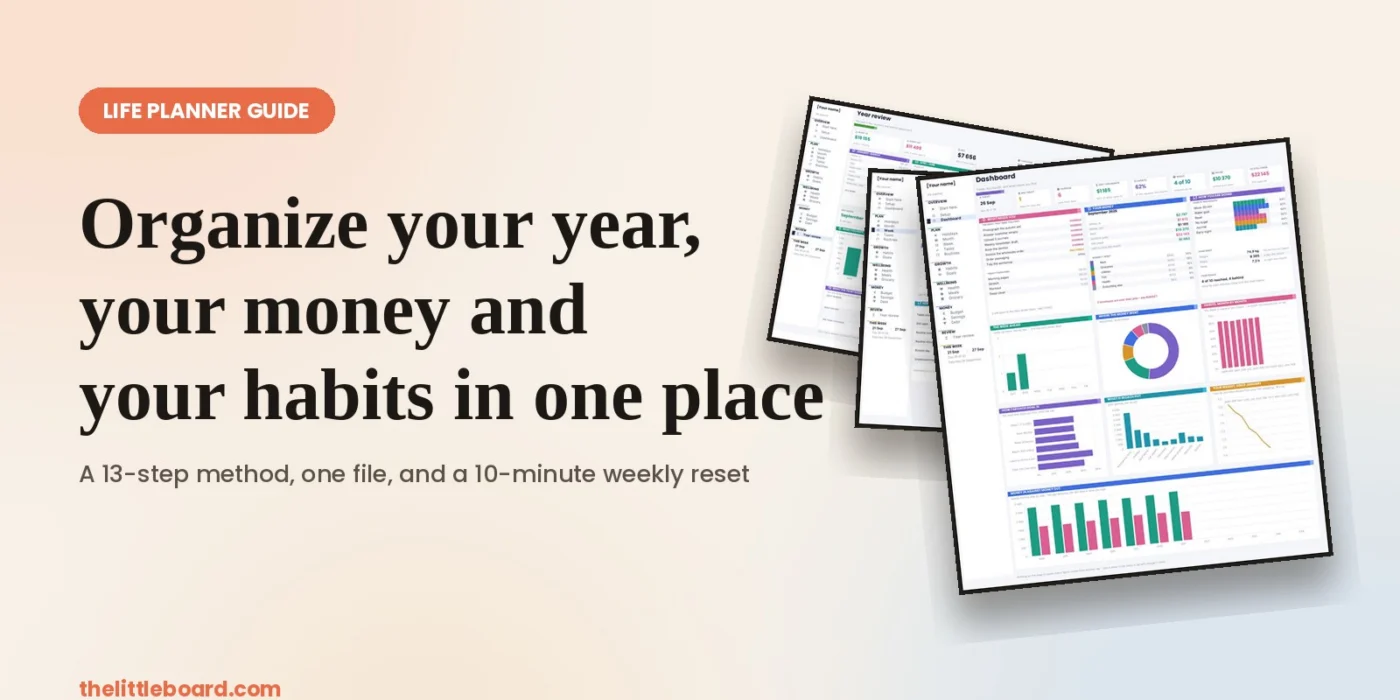
Most people do not have a planning problem. They have a scattering problem. The dentist is in a phone calendar, the grocery list is in a note, the savings goal is in a banking app, the reading habit is in a fitness tracker, and the one thing that actually matters this month is in nobody’s system at all. Each tool works. Together they leave you with no single place that can answer the only question that counts on a Monday morning: what needs me first?
This guide is about building that single place. Not a prettier to-do list, and not a new app to learn — a life planner: one file that holds your tasks, your week, your habits, your goals, your money and your health, and that adds them up for you. You can build it in a notebook, in a free spreadsheet, or with a ready-made template. The method below works either way, and every step is written so you can apply it tonight with nothing but a blank page.
We will go step by step: what to set up once, what to look at daily, what to look at weekly, and what to look at once a year. Along the way you will see pages from a spreadsheet planner that works exactly this way, so you can copy the layouts instead of inventing them. If you would rather work on paper, you can download the free printable version further down and start tonight.
This article is general education about organising and tracking your own information. It is not financial, medical or legal advice. For decisions with real consequences, talk to a qualified professional.
Why most planning systems fall apart by February — and what a good life planner has to do
It is worth knowing what you are up against before you design anything, because the failure modes are predictable and each one has a fix.
1. Your plan is split across tools that cannot talk to each other. Every switch between them costs something. In a set of experiments published in 2001 in the Journal of Experimental Psychology: Human Perception and Performance, Joshua Rubinstein, David Meyer and Jeffrey Evans measured the cost of switching between tasks and rules; Meyer later summarised the practical effect as productivity dropping by as much as 40 percent because of the mental gear-changing involved. Checking five places to find out what your day looks like is five gear-changes before you have done anything.
2. You plan for the version of you who never gets interrupted. This is not a character flaw, it is a measured bias. In a 1994 study published in the Journal of Personality and Social Psychology, Roger Buehler, Dale Griffin and Michael Ross asked students to predict when they would finish their honours thesis. The average prediction was 33.9 days. The average reality was 55.5 days, and only about 30 percent finished within their own estimate. A planner that only holds intentions will always look like a list of failures. A planner that holds dates, actuals and a rollover rule will not.
3. Nothing is set up once. If you have to decide your categories, your budget lines and your habit list every month, you will stop. Everything that does not change weekly belongs in one settings page you fill in once.
4. There is no page that tells you the truth in ten seconds. Data you enter but never read is just typing. Every system needs one front page that reads the rest of it.
5. Nothing closes. Without a weekly reset and a yearly review, a planner only accumulates. The reviews are what turn a log into a decision.
The thirteen steps below fix these five failures in order.
Step 1: Put everything in one file, and set it up once
Start by choosing the container before you choose the content. One file. Not one per area of your life. A notebook works, a single spreadsheet works better because it can add up, and the reason is simple: the moment your habits live somewhere your tasks cannot see, no page can ever tell you how your week really went.
Then spend twenty minutes on the boring part that saves you the entire year: a settings page. Write down, once:
- your task categories — six to ten, no more (Work, Home, Health, Family, Money, Admin, Learning);
- your priorities and statuses, and which statuses count as “still open”;
- the people who show up in your tasks (you, your partner, a colleague);
- your money categories and your accounts;
- the habits you are actually tracking, and how many days a week each one is aiming for;
- your units and currency, your first and last day of the plan, and the day your week starts on.
The rule is: zero settings inside your pages. If the target for “read 20 minutes” is written in four places, it will be wrong in three of them by March. Write it once, and let every other page point at it.
This is also where you decide the scope of the year. A plan that runs from today to the end of next year is more useful than a January-to-December one, because you are starting today, not on 1 January.
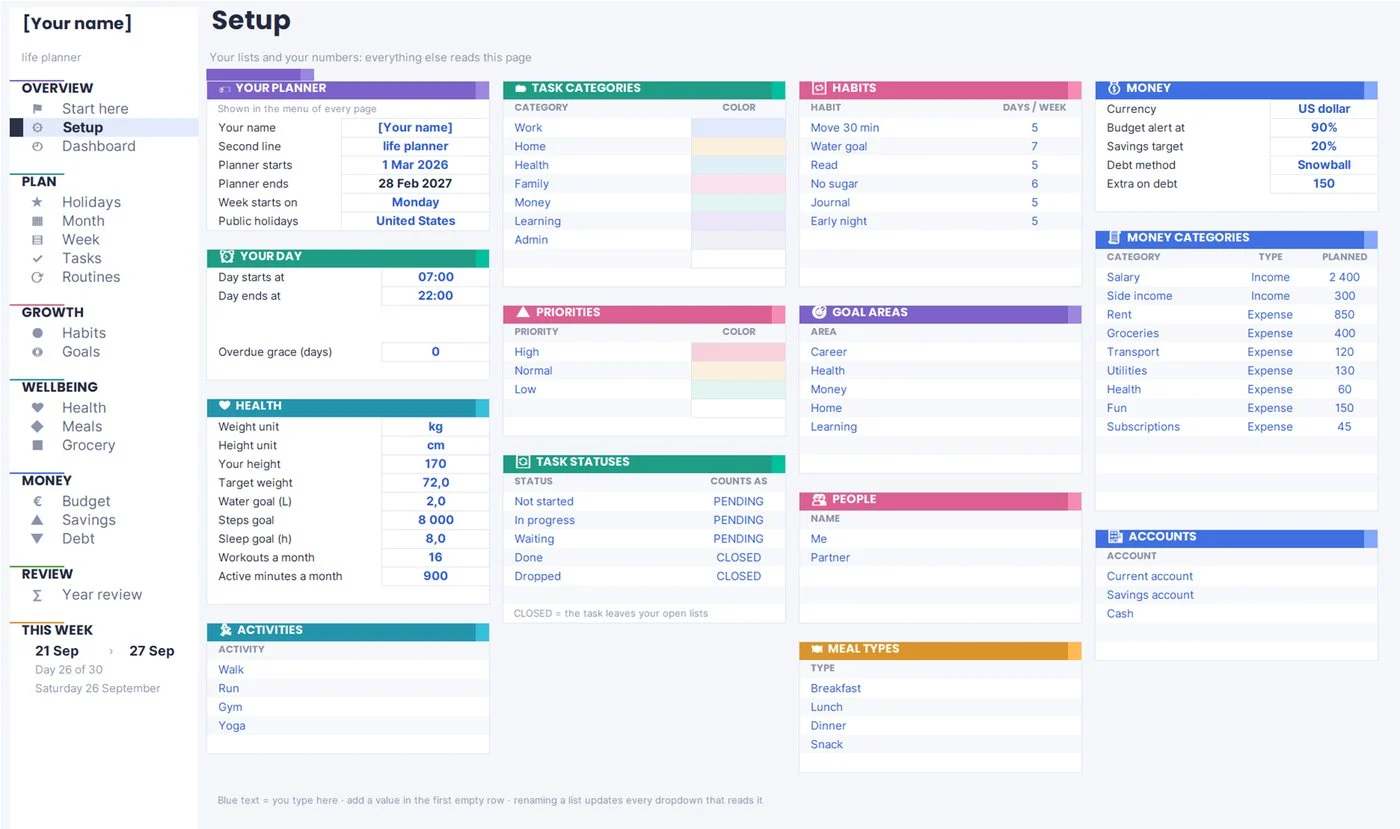
Quick win. Before you write a single task, fill in your eight habits and your six money categories. Those two lists alone remove about half the decisions you would otherwise make every week.
Step 2: Build a front page you can read in thirty seconds
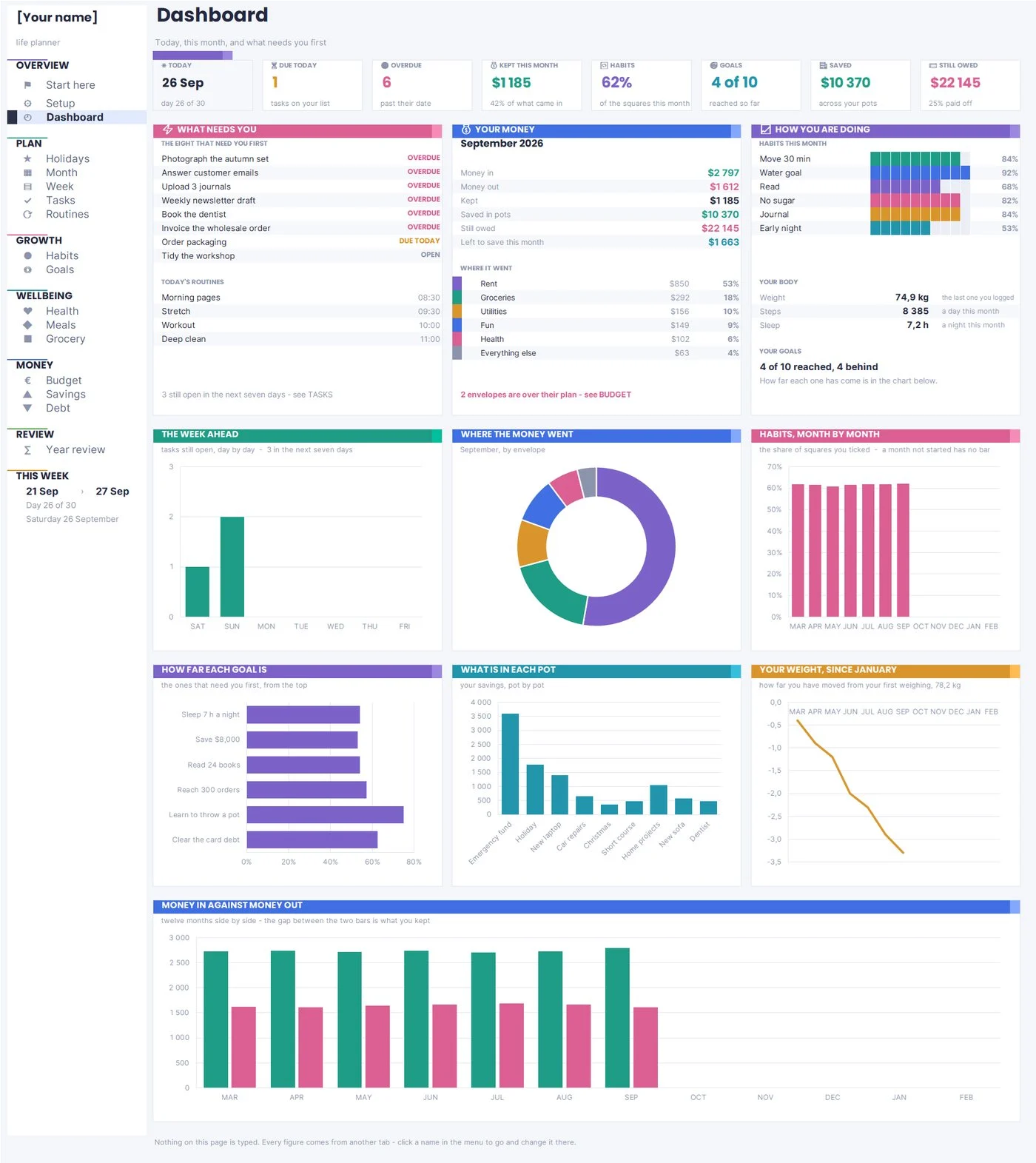
The front page is the whole point of keeping one file. It types nothing and decides nothing — it reads everything else and answers four questions: what is late, what is due today, where is my money this month, and am I keeping the habits I said mattered.
Build it with numbers, not decoration. A useful dashboard has:
- a row of single figures at the top — today’s date, tasks due today, tasks overdue, money kept this month, habit rate, goals reached, total saved, total still owed;
- a short list of the eight things that need you first, sorted so that overdue items are at the top;
- this month’s money in, money out and what you kept;
- the habit grid for the current month at a glance.
Two rules make this page trustworthy. First, nothing on it is typed — if a figure is wrong, it is wrong in the page underneath, and you fix it there. Second, it shows a short list, not everything. Eight items is a morning. Forty items is a reason to close the file.
In Getting Things Done, David Allen argues that the mind is for having ideas, not holding them, and that the relief comes from trusting a system enough to stop rehearsing it. A front page is what makes a system trustworthy: you look in one place, and if it is empty, you are genuinely free.
Step 3: Block the fixed year before you plan anything else
Before tasks, before goals, put in the dates you do not control: public holidays, school terms, birthdays, the two weeks you are away, the quarter-end at work, the annual insurance renewal. They are the shape of your year, and planning around them is the difference between a plan that survives August and one that does not.
Doing this first has a second benefit: it tells you truthfully how many usable weeks you have. People routinely plan twelve months of ambition into a year that contains about forty working weeks once holidays, travel and known-busy periods are removed.
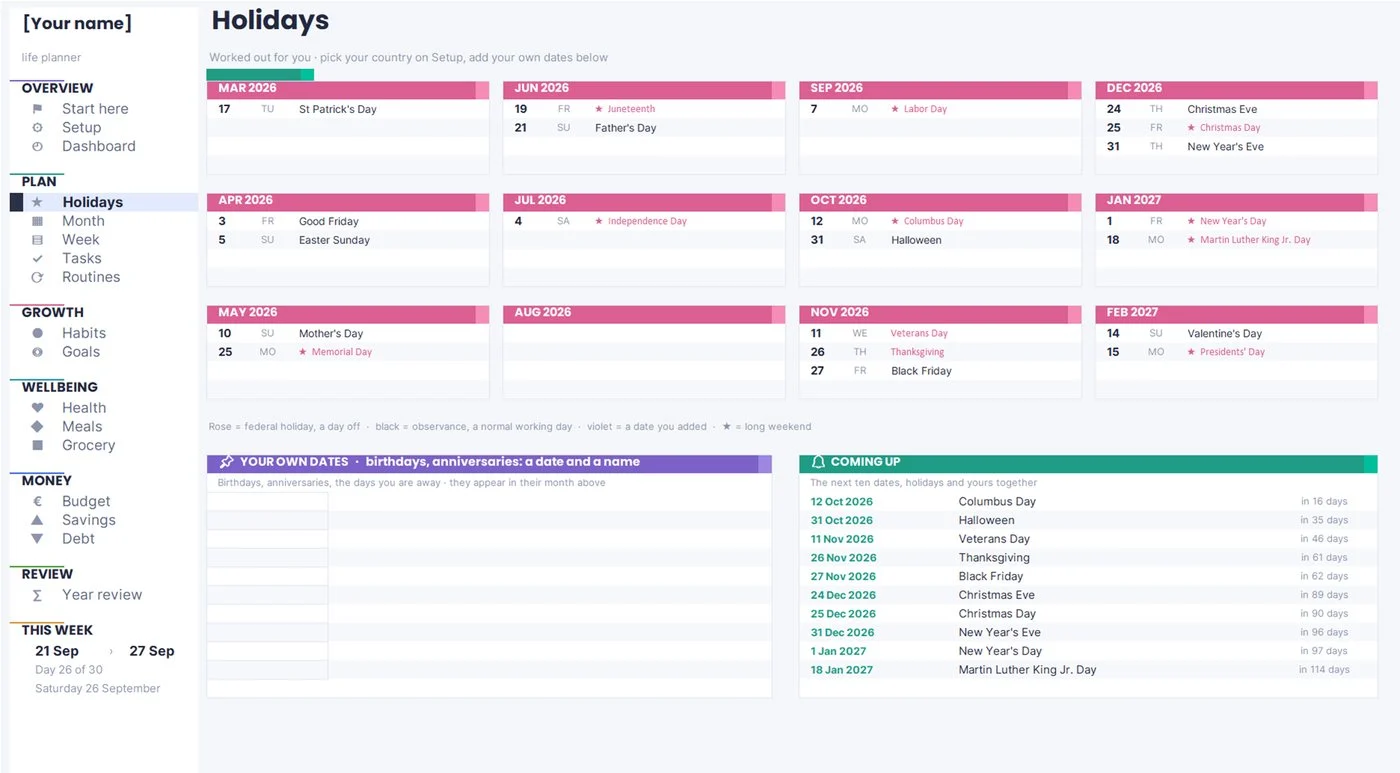
Quick win. Add one line per recurring annual admin task while you are here — passport, car inspection, domain renewal, tax deadline. These are the tasks that are never urgent until they are.
Step 4: Plan the month on a calendar, then give the week real hours
A list tells you what you owe. A calendar tells you whether it fits. Those are different questions, and the second one is the one people skip.
Work at two levels. Once a month, put every dated commitment on a month grid — deadlines, appointments, trips, bills — and look at the density. If a week already has four fixed blocks, it is not the week to start a new habit or ship a side project. Then once a week, take the three to five things that matter and give them actual hours, not intentions.
Cal Newport’s argument in Deep Work is that concentration is a scheduled resource, not a mood: the work that matters gets a slot on the calendar, or it gets whatever is left over, which is nothing. You do not have to time-block your whole day for this to pay off. Blocking two hours, twice a week, for the one thing you keep postponing is enough to change a quarter.
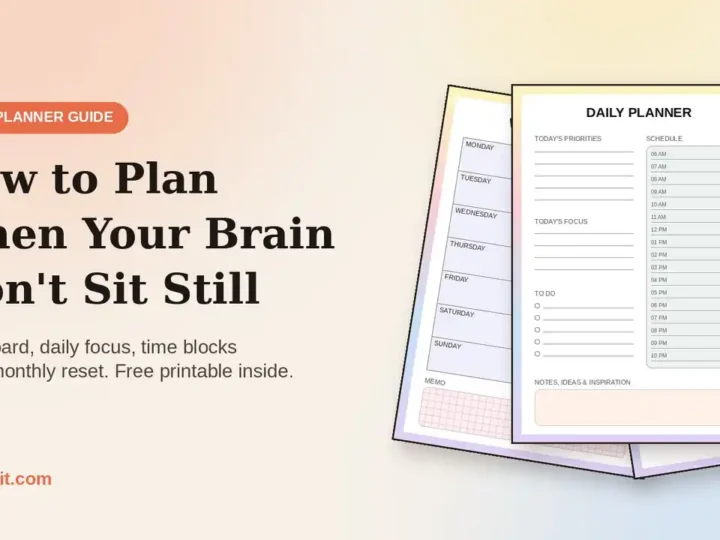
A practical weekly layout that works on paper or in a spreadsheet:
- seven columns, one per day, split into time slots from when your day starts to when it ends;
- the tasks that are due that week already sitting on their day, so you are arranging rather than remembering;
- a small block at the bottom for the week’s review — what got done, what moved, what you are dropping.
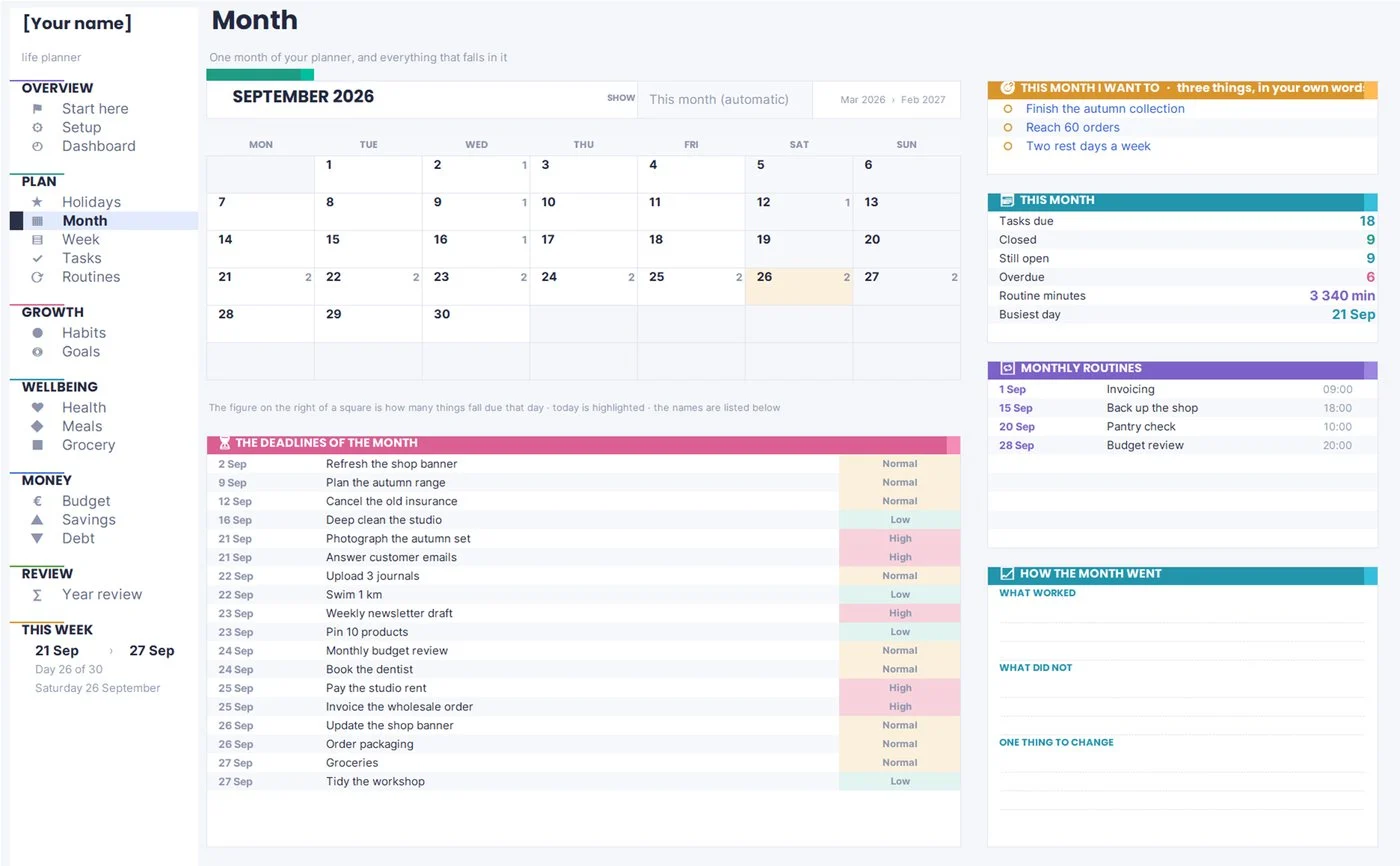
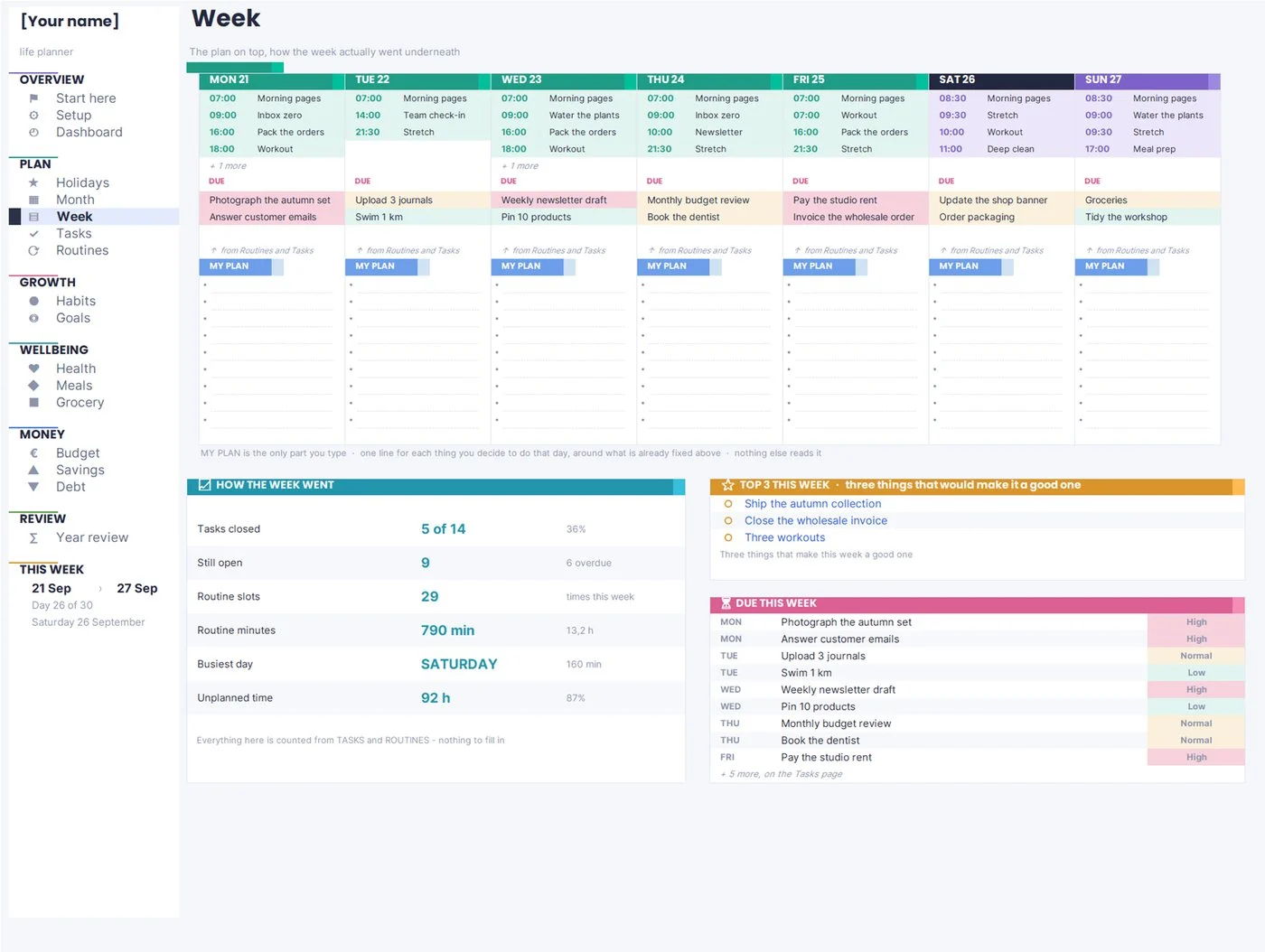
A word on realism. Because of the planning fallacy described earlier, add half again to your own estimate for anything you have not done before. If you think the tax return is two hours, book three. You will either be right or pleasantly early, and neither outcome damages the plan.
- 40 pages, US Letter PDF
- Year, month, week, habits, money
- Instant download, no spam
Get the free printable life planner
The paper version of the method in this guide: year, month and week pages, a habit grid, goals, and a simple money section. Print the pages you need and start this week.
Step 5: Keep one task list — and stop putting routines in it
This is the single change that makes most planners usable, and almost nobody does it: one-off tasks and repeating routines are different objects and belong on different pages.
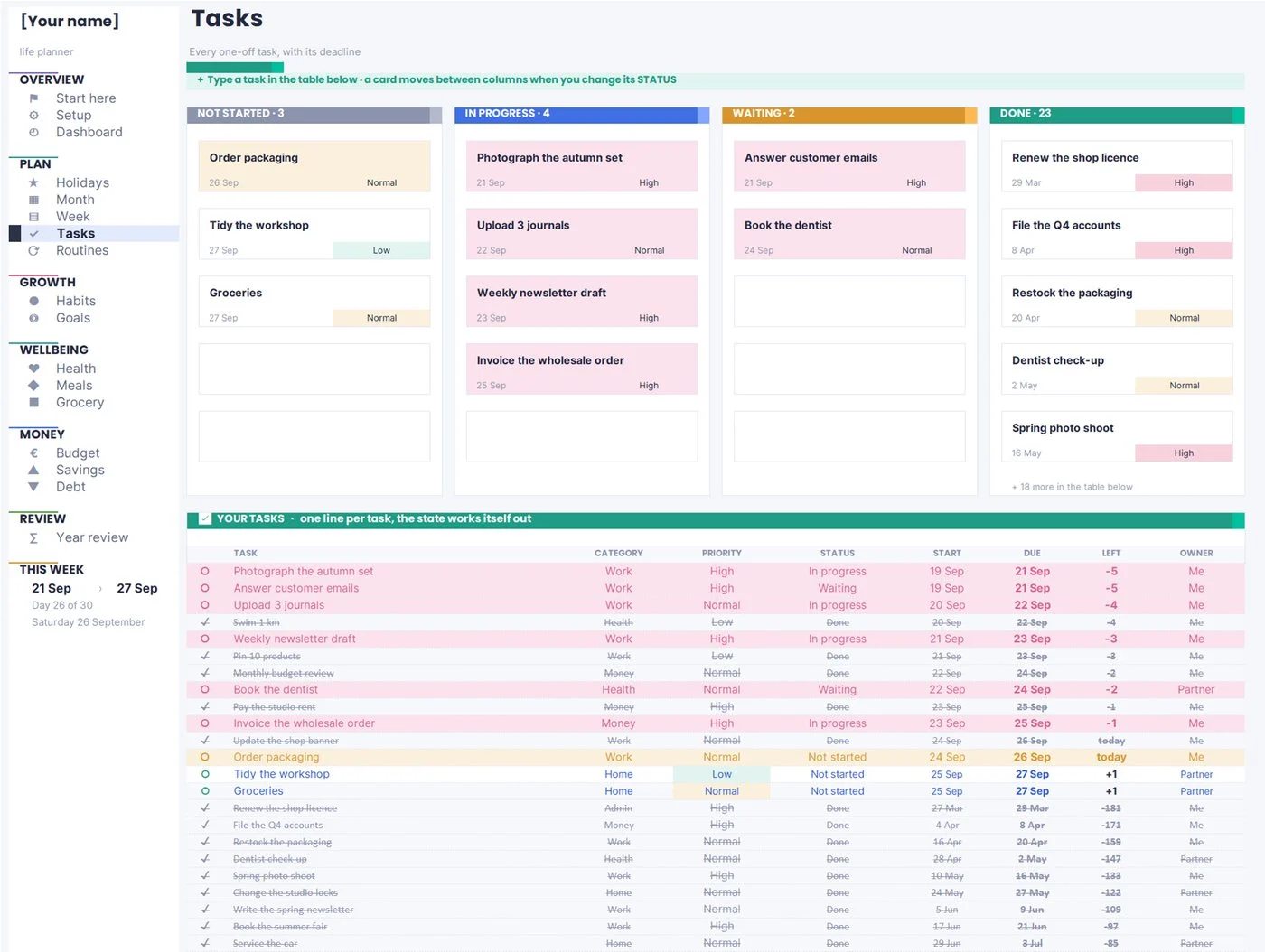
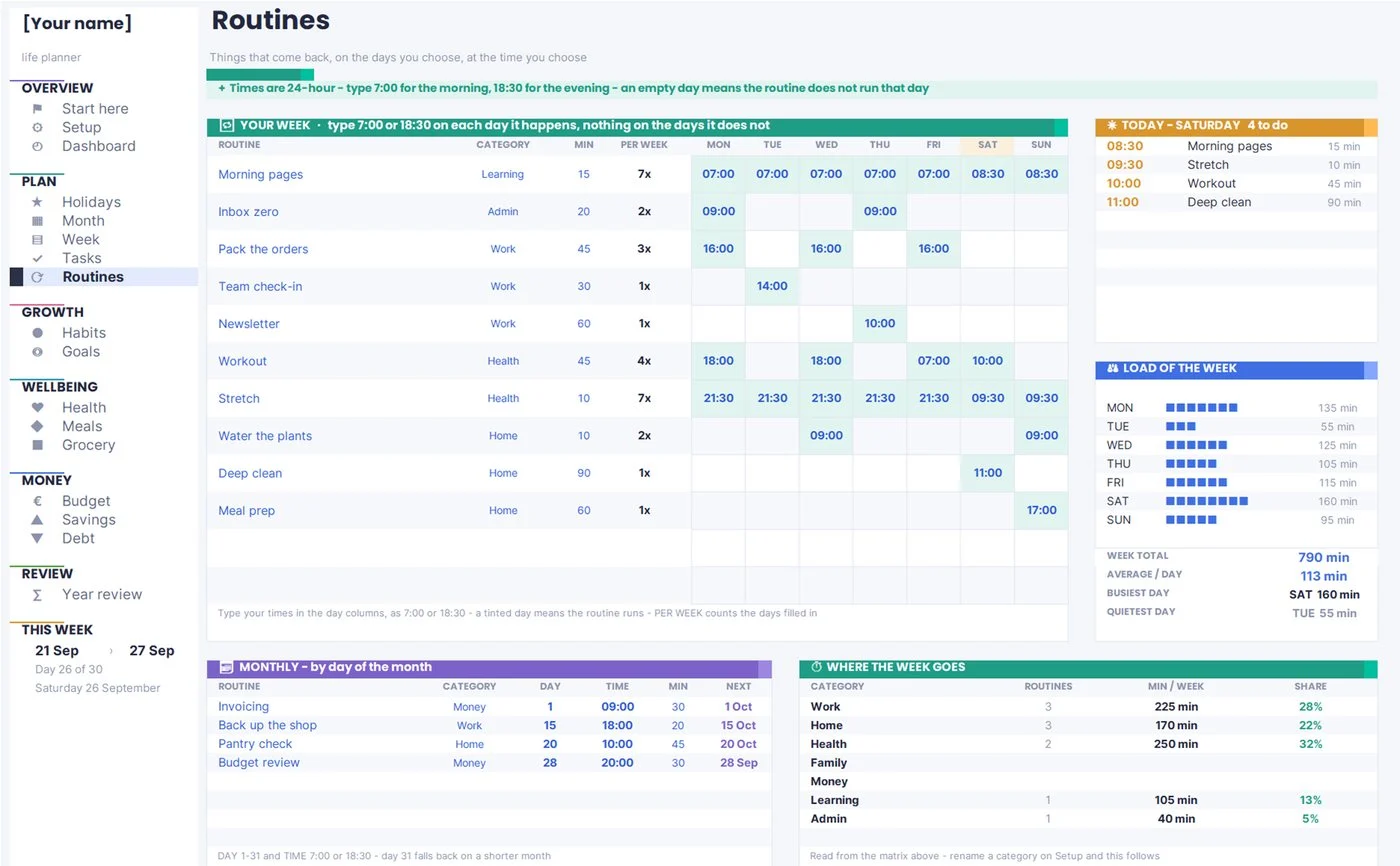
A one-off task has a due date, a category, a priority and a status, and it disappears when it is done. “Book the dentist” is a task. A routine has a rhythm and never disappears: “morning pages, weekdays, 08:30” is a routine. Mixing them means your task list is 80 percent noise every morning, and the real work hides behind the washing-up.
For the task list, four columns carry almost all the value:
| Column | Why it earns its place |
|---|---|
| Due date | Turns the list into a calendar, and makes “overdue” a fact rather than a feeling |
| Category | Lets you see that this week was 80 percent admin before you blame yourself for it |
| Priority | Three levels only. Five is a decision you will avoid making |
| Status | Two of them mean “still open”, the rest mean “gone”. That distinction drives every count |
Then add the one rule that saves the system: a rollover. Anything not finished yesterday comes back to the top of today with its age attached. Ryder Carroll built the same idea into The Bullet Journal Method as migration: you rewrite what is still open, and the small friction of rewriting it is a filter. If a task has been migrated four times, it is not a task, it is a decision you have not made.
Routines go on their own page as a grid: one row per routine, one column per day, the time of day written in the cell. That page is where “gym Tuesday and Thursday, 07:00” and “invoices, last Friday of the month” live, and it feeds your week without ever touching your task list.
If your attention is the real obstacle rather than your system, the approach in our guide to planning with an ADHD planner is built around exactly this separation: fewer open loops, and a list that forgives a bad day.
Want the tasks-and-week part only?A ready-made Google Sheets to-do list, calendar and weekly schedule, with the rollover rule and the routines grid already built.
Step 6: Track habits as squares, not as to-dos
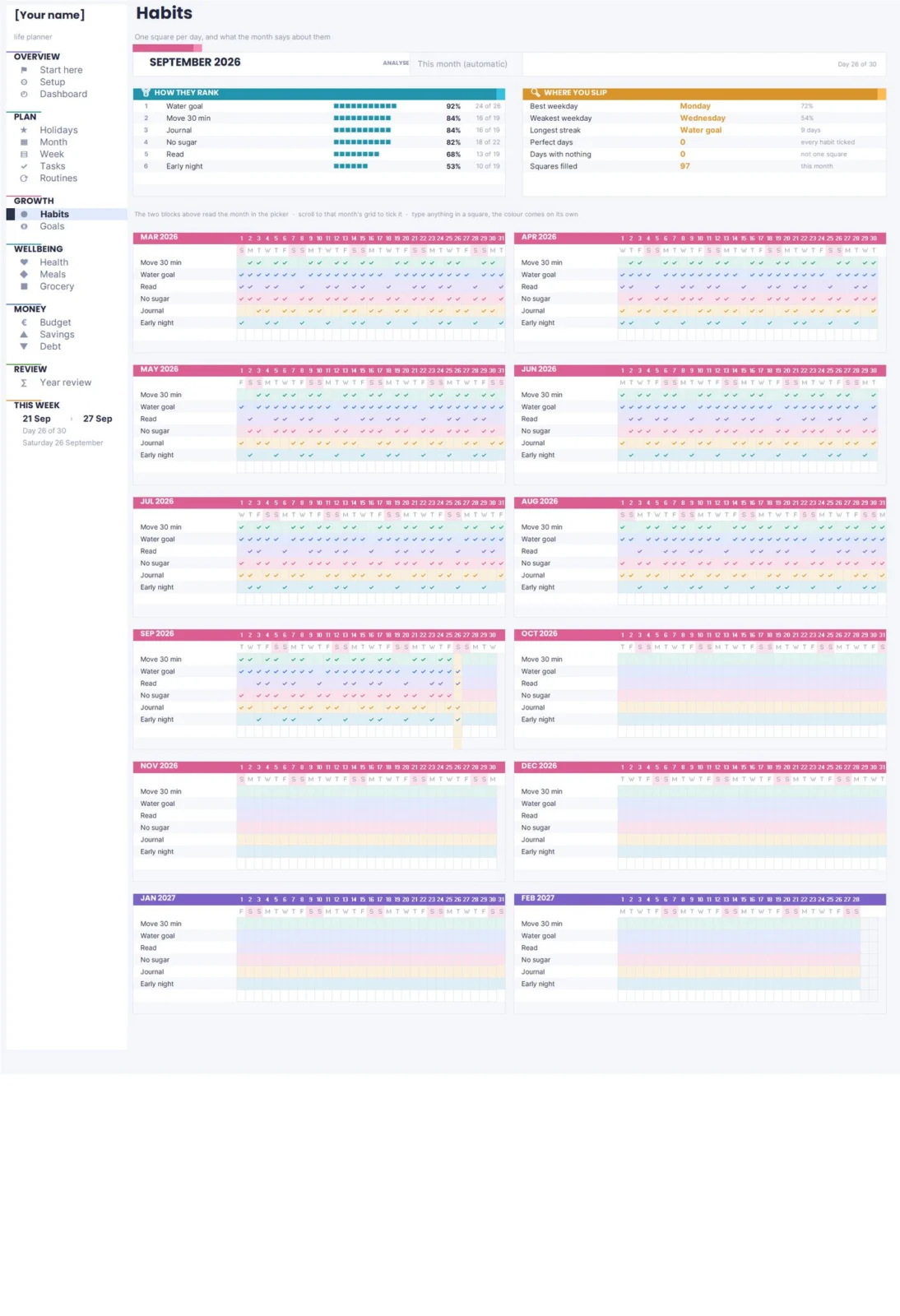
A habit is not a task, and putting it on your task list guarantees you will feel behind every single day. Habits belong on a grid: one row per habit, one square per day of the month, ticked or not. What you are looking at is not today — it is the shape of the month.
The evidence here is more forgiving than the folklore. In a 2010 study published in the European Journal of Social Psychology, Phillippa Lally and colleagues followed volunteers adopting a new daily behaviour; among the participants whose data could be modelled, the median time to reach automaticity was 66 days, with an enormous spread from 18 to 254 days depending on the person and the behaviour. The famous “21 days” is a myth, and so is the idea that one slip resets you: the study found that missing a single day did not meaningfully affect the curve.
Design your grid around that finding:
- pick a target of days per week per habit, not “every day” — 5 out of 7 is a real target, 7 out of 7 is a trap;
- show the percentage of squares ticked for the month and the current streak, but treat the percentage as the real number;
- keep last month’s grid visible. The month-by-month view is the only one that shows whether anything is actually sticking.
This is the practical core of James Clear’s Atomic Habits: make the behaviour small enough to survive a bad day, make it visible, and never miss twice. A grid does the visible part for free.
Step 7: Turn goals into milestones with dates
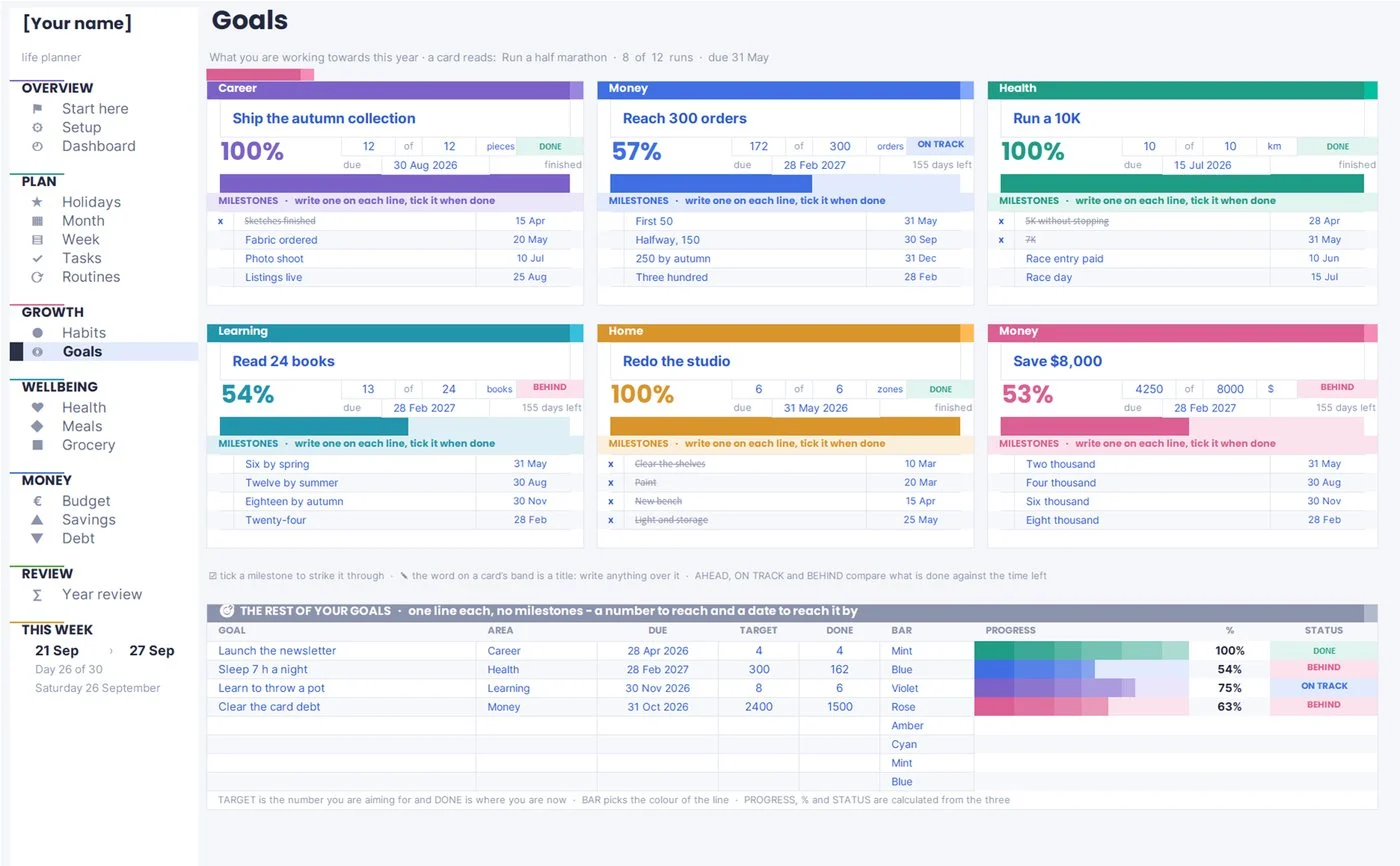
“Get fit”, “save more”, “write the book” are directions, not goals. A goal your planner can help with has three things: a finish line you could photograph, a date, and a first milestone that is small enough to start this week.
Then attach the behaviour to a moment. Peter Gollwitzer and Paschal Sheeran’s 2006 meta-analysis pooled 94 independent tests with more than 8,000 participants and found that turning a goal into an if-then plan — when situation X happens, I will do Y — produced a medium-to-large improvement in goal attainment (d = 0.65) over simply holding the intention. “I will run more” loses. “When I finish work on Tuesday and Thursday, I put my shoes on before I sit down” wins.
A workable goals page has one row per goal with an area, a target, a due date and a progress figure, plus a handful of milestones underneath each one that you tick as you pass them. Six to ten goals for a year is plenty; twenty is a list you will stop opening.
Brian Moran and Michael Lennington’s The 12 Week Year is the useful corrective here: a twelve-month horizon lets everything slip to “later”, so they compress execution into twelve-week blocks with weekly scoring. Even if you keep annual goals, give each one a deadline inside the next quarter for its next milestone.
Step 8: Give every month a money plan, then compare it with reality
Money is the part of a life planner people most often keep somewhere else, and it is the part that benefits most from living next to everything else — because the reason last month went wrong is usually written on your calendar, not in your bank app.
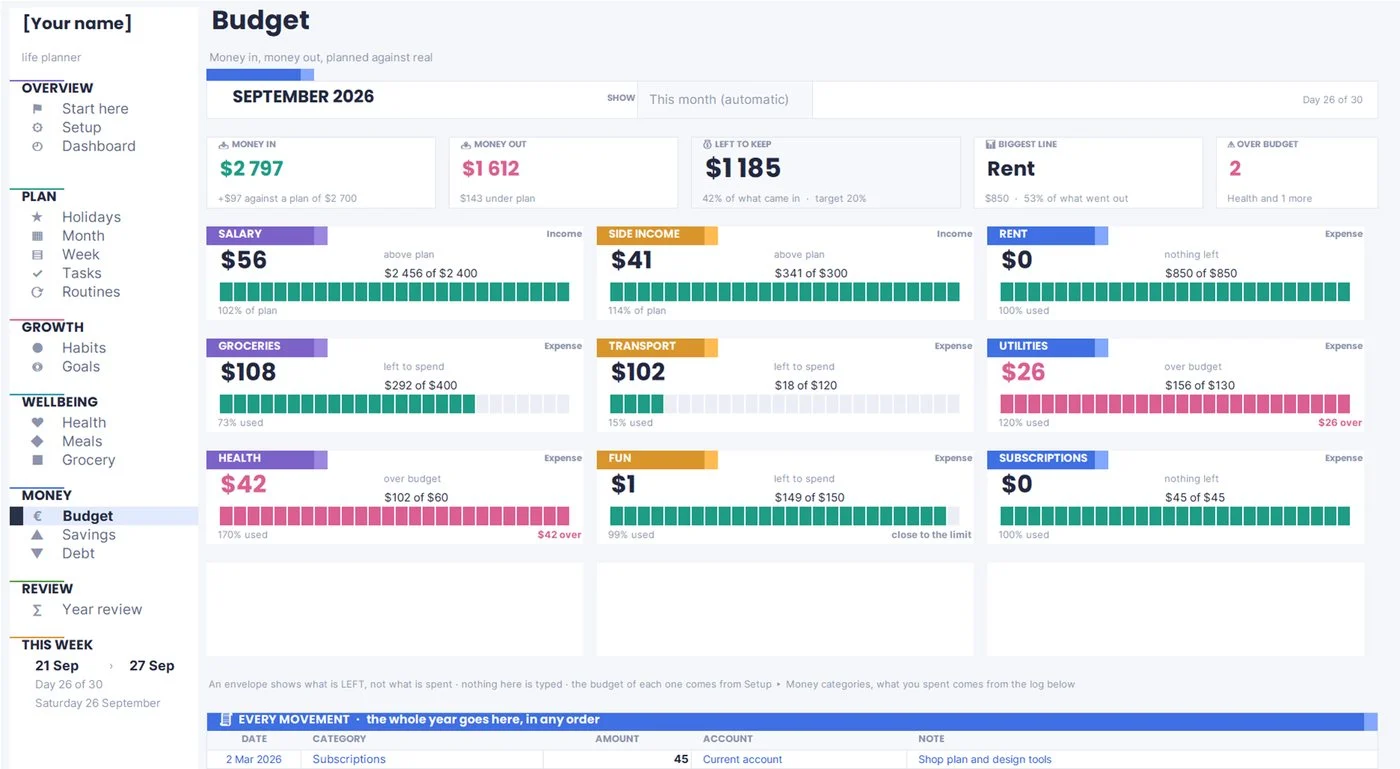
The method is unchanged whatever tool you use. Write what you expect to come in. Write what you plan to spend, one line per category. Then, through the month, write what actually happened next to it. The gap between planned and actual is the entire product: it is what tells you that groceries are not a $400 category, they are a $540 category, and that arguing with the number for another six months is not a plan.
Three details make the page work:
- Use last month’s real numbers for your first plan, not the numbers you wish were true.
- Set an alert level — 90 percent of a category’s plan is the point where you want to know, not 100 percent.
- Keep irregular costs out of the monthly lines. Car repairs, Christmas and the annual insurance bill are not overspending, they are underplanning. They belong in the savings step below.
Vicki Robin and Joe Dominguez’s Your Money or Your Life makes the point that tracking is not accounting, it is a way of seeing what your spending buys you in hours of your life. That is easier to feel when the money page sits three clicks from your goals page. If you want the long version of this step on its own, our full guide on how to make a budget that actually works walks through the methods — 50/30/20, zero-based and envelopes — and when each one fits.
Step 9: Save in pots, not in one pile
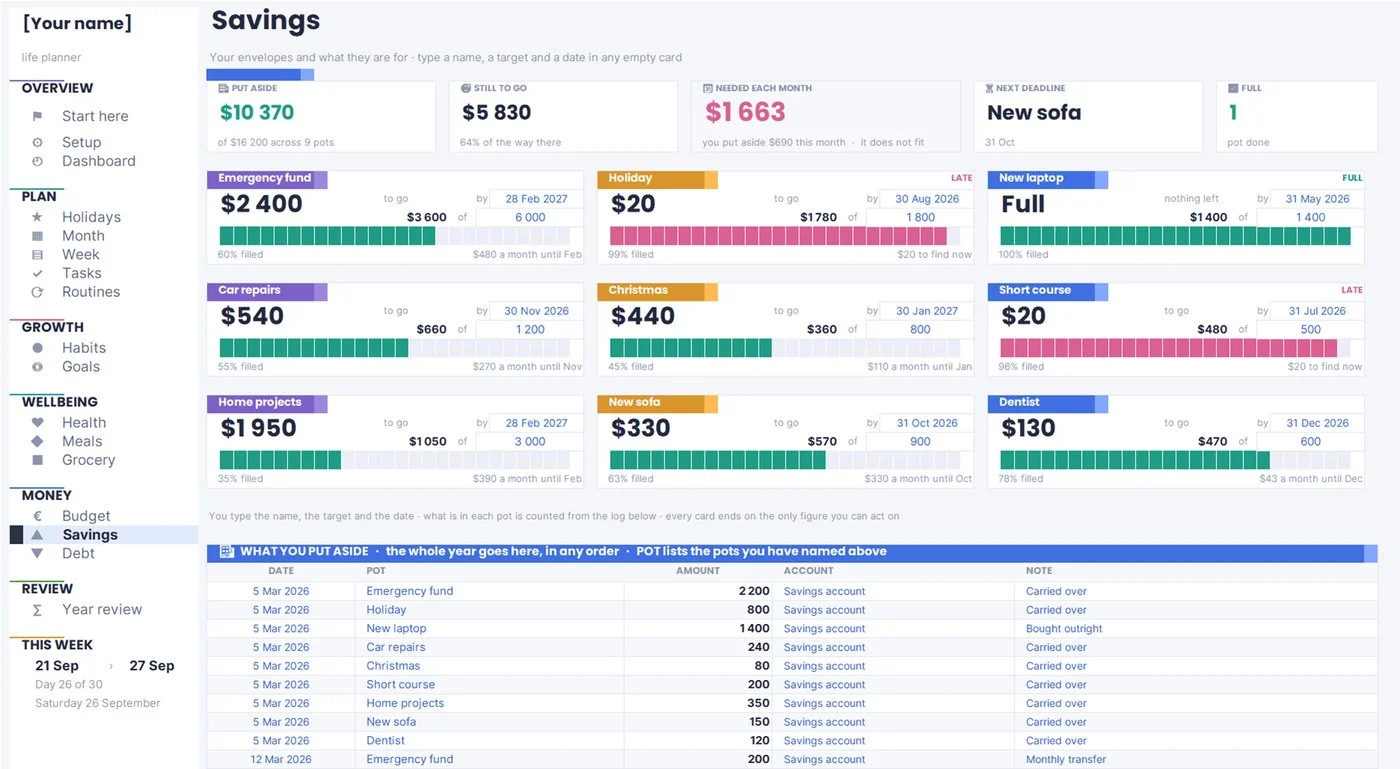
One savings number is almost impossible to protect, because it has no job. Split it into pots — emergency fund, car repairs, Christmas, the trip, the new laptop — each with a target and a date. The technique is old and has a name, sinking funds, and it works because it converts a vague “I should save” into twelve small, obviously affordable monthly amounts.
It also fixes the biggest cause of debt in otherwise careful households: the expense that was always going to happen and was never budgeted. The Federal Reserve’s survey of household economics, published in 2026 for the 2025 year, found that 63 percent of adults said they could cover a hypothetical $400 emergency with cash or its equivalent — which means more than a third could not. An emergency pot is the first one to fill, before every other goal on the list.
Practical shape for the page: one row per pot, with the target, the date, what is in it now, and what you need to put in each month to land on time. If you want a specific push to fill the first one, our guide to money saving challenges covers the ones that actually get finished, and our guide to sinking funds covers how to price and schedule every irregular cost you can already see coming.
Step 10: Pick one debt order and stop re-deciding it
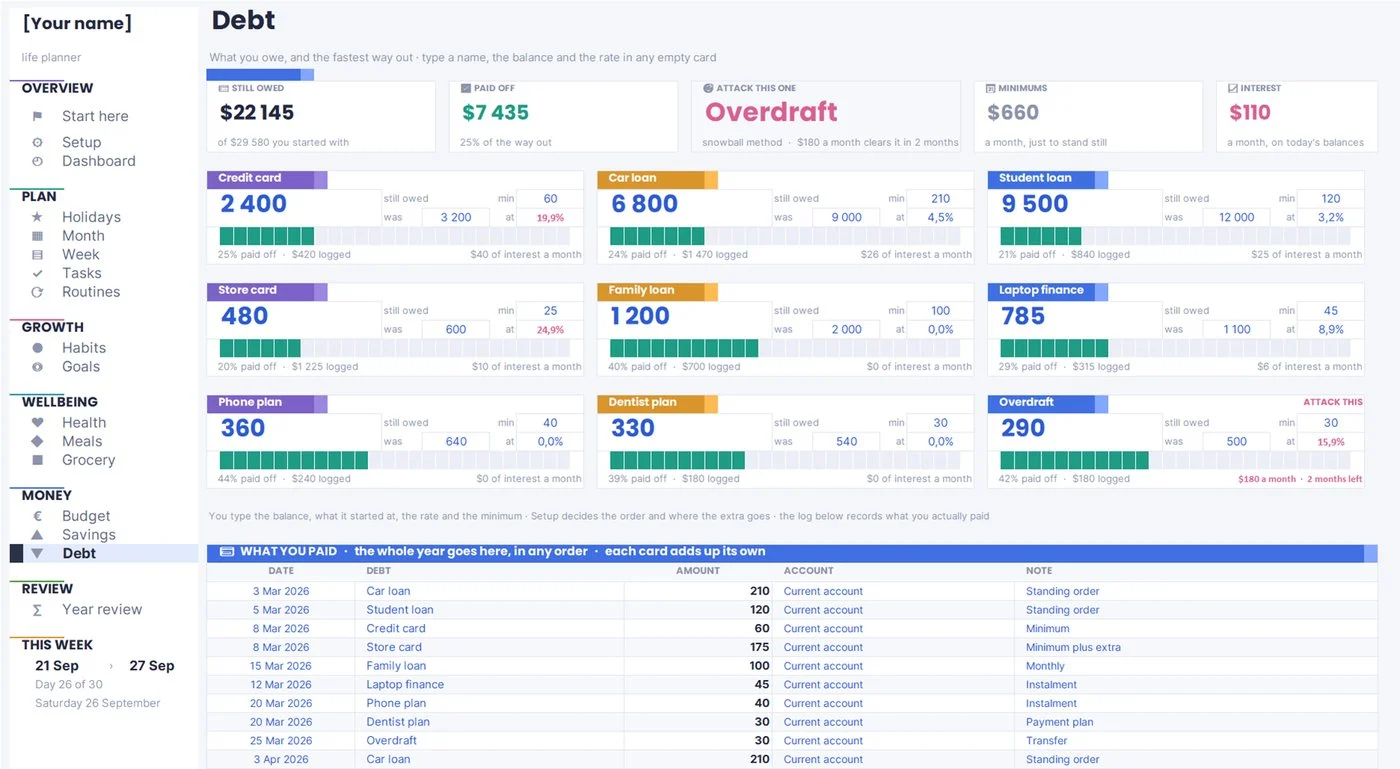
If you are carrying balances, the planner’s job is not to make you feel bad about them once a month. It is to hold three facts per debt — balance, rate, minimum payment — and one decision: the order you pay them in.
There are two defensible orders. Avalanche pays the highest interest rate first and costs you the least money. Snowball, popularised by Dave Ramsey in The Total Money Makeover, pays the smallest balance first and costs slightly more in interest, but closes an account sooner, which for a lot of people is what keeps the plan alive. Choose one on the settings page, let the planner sort the list, and then never spend another evening re-litigating it.
Whatever you choose, keep the extra payment amount visible. A plan that shows “the extra $150 clears this card in four months” behaves very differently from one that shows a balance and nothing else.
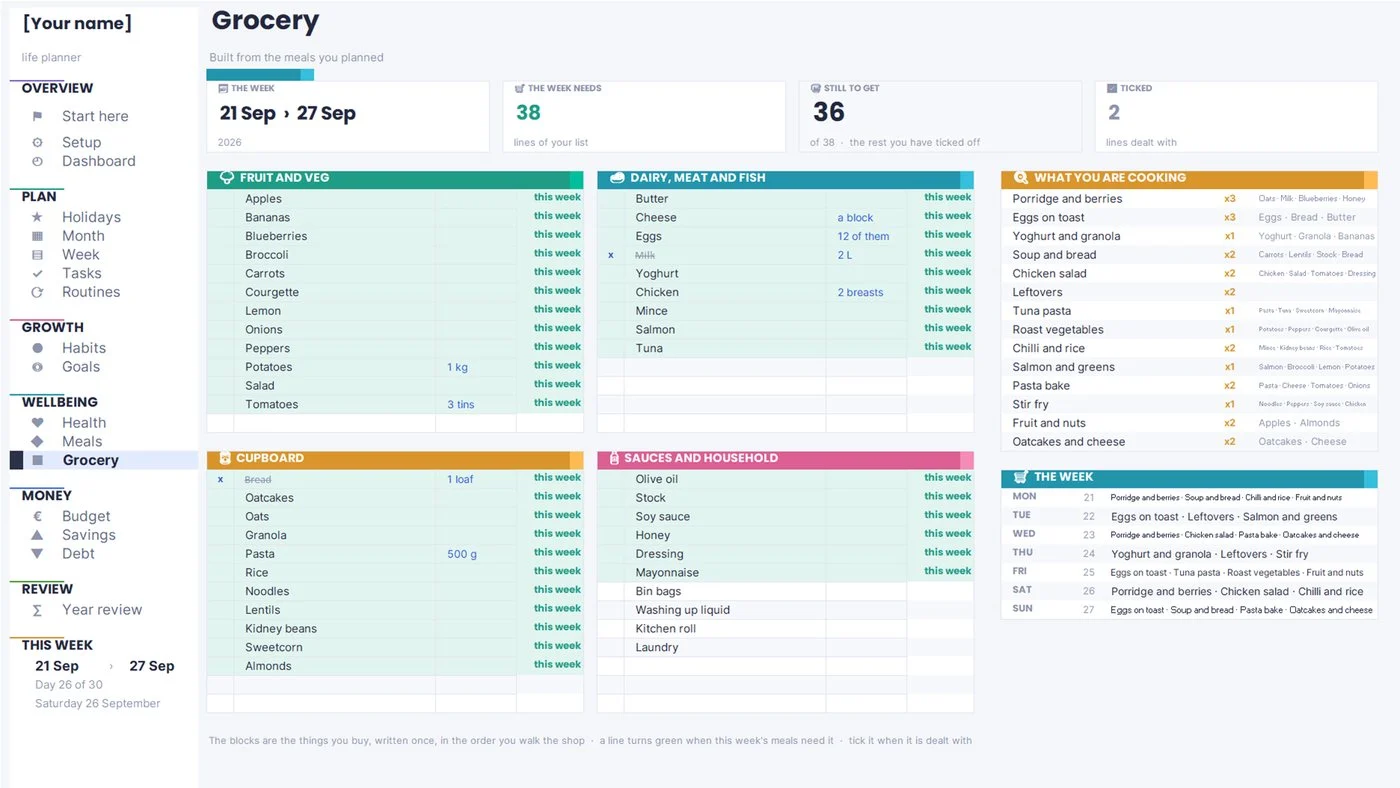
Step 11: Plan meals once and let the grocery list write itself
Meal planning belongs in a life planner for an unglamorous reason: it is the decision you make most often, it is usually made while tired and hungry, and it quietly drives one of the largest lines in your budget.
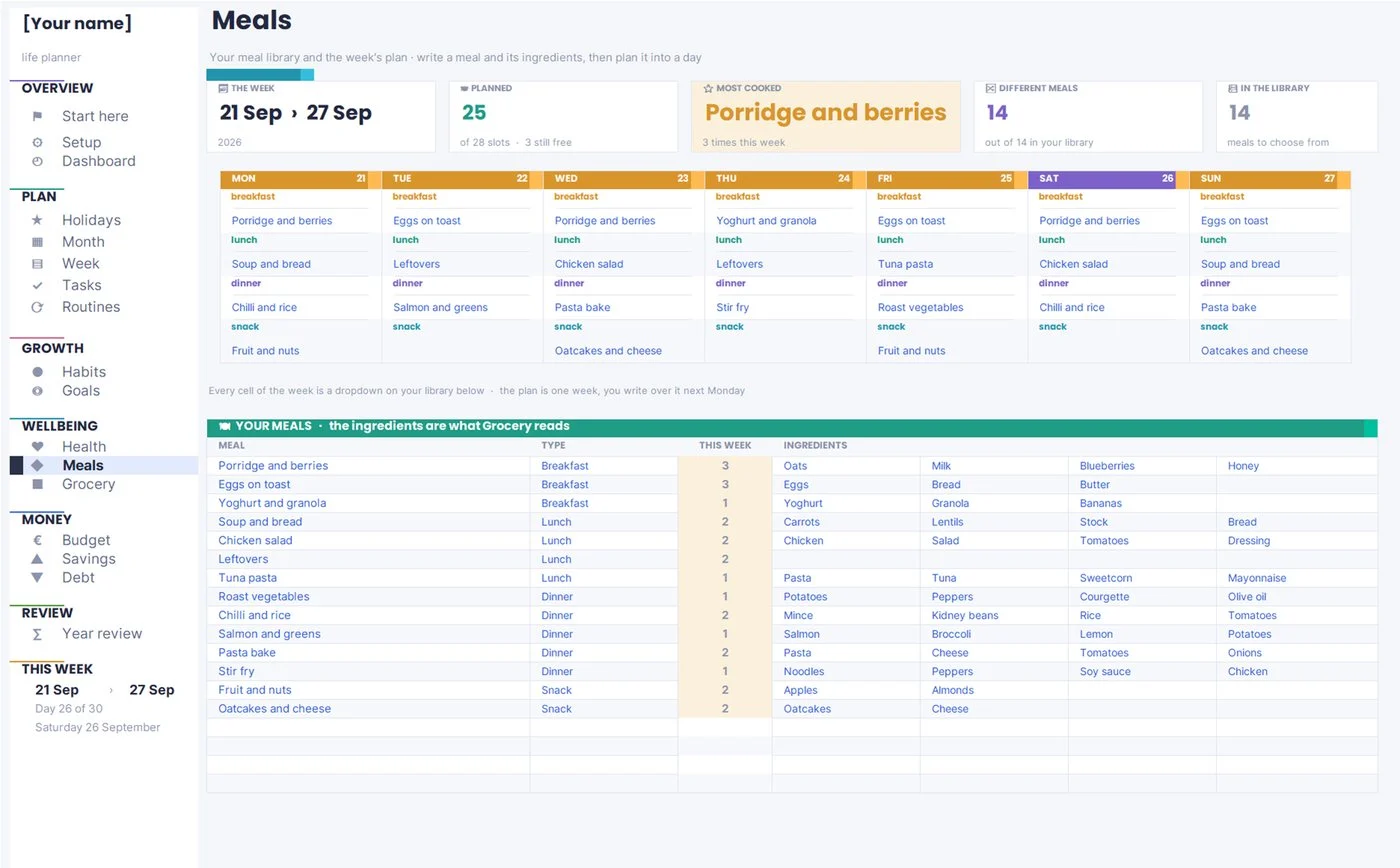
Do it in two parts. Keep a small library of meals you actually cook — twenty is a lot — each with its ingredients written down once. Then planning the week is choosing from a list instead of inventing from nothing, and the grocery list is something the plan produces rather than something you write again on Saturday morning.
Two habits make this survive real life: leave two evenings a week unplanned, and keep three “no-effort” meals permanently in the library for the days when the plan loses.
Step 12: Track health lightly enough that you keep doing it
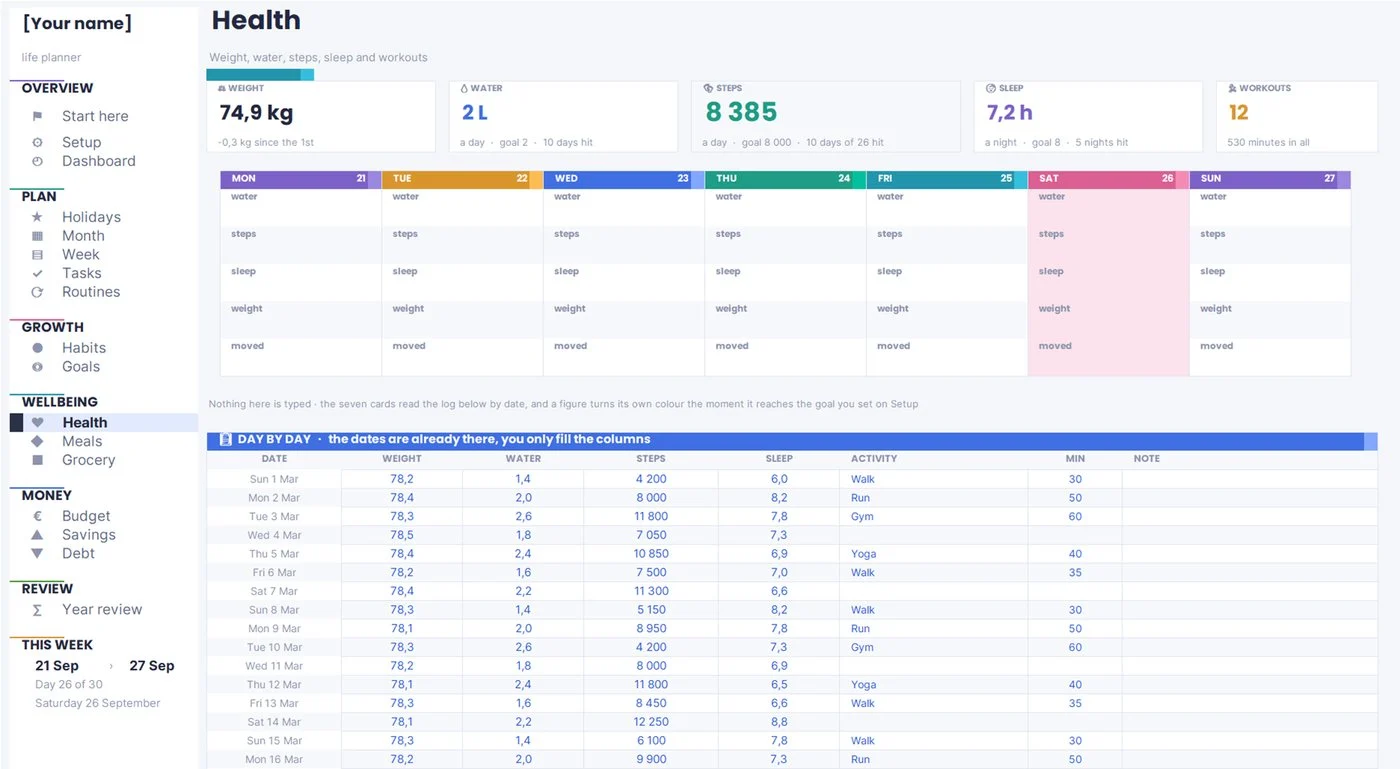
The reason most health tracking dies is that it asks for too much. Four numbers, written in ten seconds, beat fourteen numbers written for nine days and then abandoned: weight or a measurement if it is relevant to you, sleep, water, and movement.
Two design choices matter more than the metrics themselves. Look at a rolling average rather than today’s number, because daily weight and daily sleep are noisy enough to be actively discouraging. And set your goals on the settings page in the units you think in, so you are never doing arithmetic before breakfast.
If a figure has medical significance for you, this is a log to bring to a professional, not a diagnosis. That is the whole ambition of the page: make the last three months visible so somebody qualified can see the trend.
Step 13: Close the year with a review you will actually reread
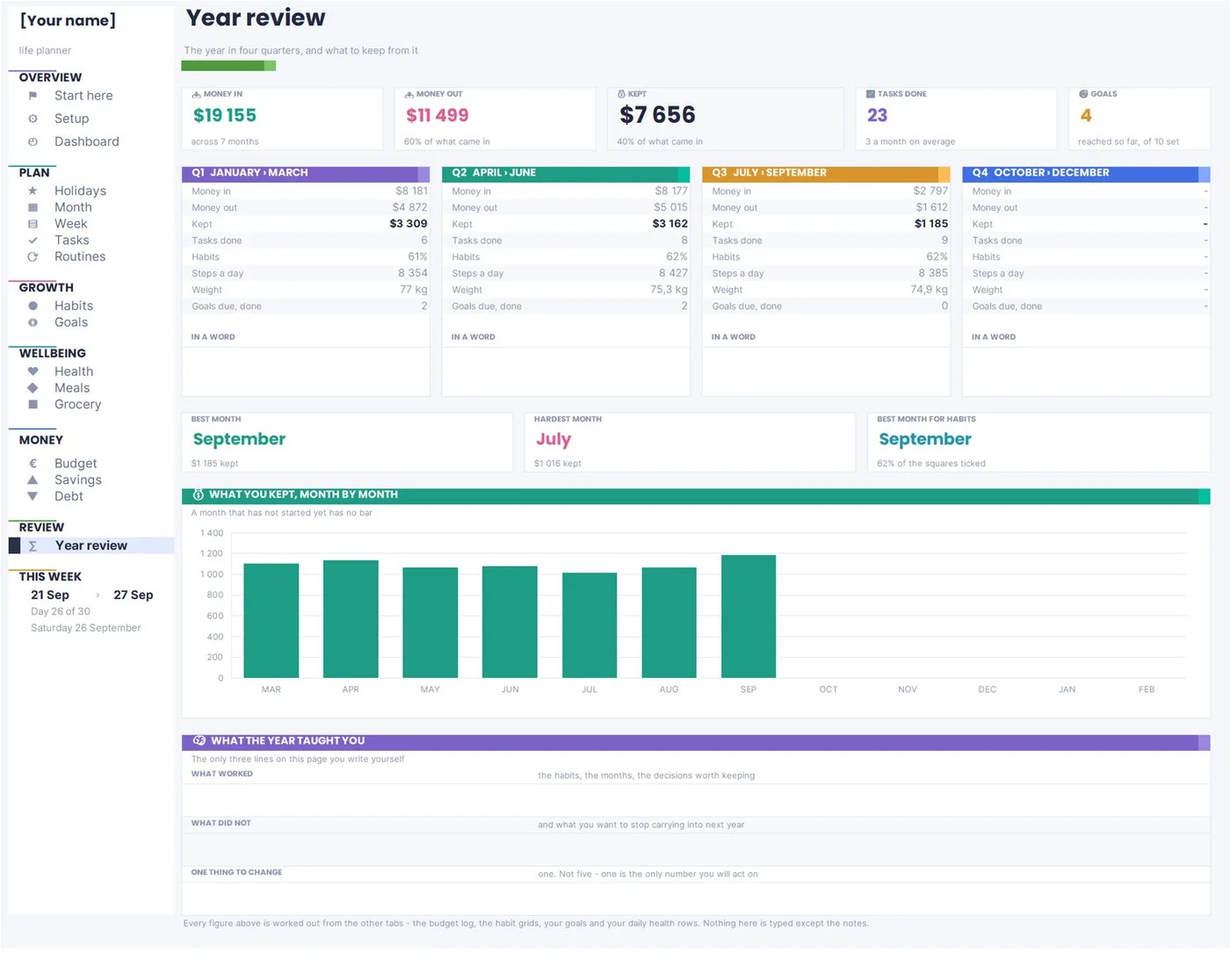
A planner that never closes is a diary. The review is what turns twelve months of entries into three decisions for next year, and it works best when the numbers are already there and you only have to write the sentences.
Put the year side by side, quarter by quarter: money in, money out, what you kept, tasks done, habit rate, goals reached, and whatever body or study figure you track. Then answer three questions in your own words, and no more than three:
- What worked? The habits, the months and the decisions worth carrying forward.
- What did not? Said plainly, so you stop paying for it next year.
- One thing to change. One. Not five. One is the only number you will act on.
This is the discipline Greg McKeown argues for in Essentialism: the value of a review is not the list of everything you did, it is the permission it gives you to drop things. If the review does not remove something from next year, it has not finished.
Prefer to write it by hand?The same structure — year, month, week, goals, habits and money in one place — as a hyperlinked planner you can use on a tablet or print.
The ten-minute weekly reset that keeps the whole thing alive
Every system described above stands or falls on one small ritual. Pick a fixed slot — Sunday evening, Friday at five, Monday before anyone emails you — and give it ten minutes. Same time, every week.
- Clear the overdue list. Every open task gets one of three verdicts: do it now if it takes two minutes, give it a new date, or delete it. Nothing keeps its old date.
- Look at next week’s calendar. Count the fixed blocks. Decide what will not happen this week, on purpose, while it is still your decision.
- Put three things in the diary. Not thirty. Three, with hours attached.
- Enter the week’s money. Five minutes of receipts beats an hour at the end of the month, and it is the only way the planned-against-actual gap stays honest.
- Look at the habit grid and the goals. Not to judge it — to notice which habit has quietly stopped and whether a goal needs its next milestone.
Once a month, add five minutes: refill the savings pots, check the debt order still makes sense, and plan the meals for the first week. Once a quarter, reread your goals and drop one.
Eight books that will change how you plan your year
Getting Things Done — David Allen. The case for capturing everything in one trusted place, and for the weekly review as the thing that keeps it trustworthy. The source of most modern task systems.
The Bullet Journal Method — Ryder Carroll. Migration as a filter: rewriting what is still open forces you to admit what you are never going to do. Works just as well in a spreadsheet as in a notebook.
Atomic Habits — James Clear. Make it small, make it obvious, never miss twice. The best short argument for tracking habits as squares rather than as goals.
Deep Work — Cal Newport. Concentration is scheduled, not summoned. Read it if your week is full but the work that matters never moves.
The 12 Week Year — Brian Moran and Michael Lennington. A twelve-month deadline is a licence to procrastinate for eleven. Compresses execution into quarters with weekly scoring.
Essentialism — Greg McKeown. The discipline of doing less on purpose. The right book to read the week before your yearly review.
Your Money or Your Life — Vicki Robin and Joe Dominguez. Reframes spending as hours of your life, which makes tracking feel like information rather than punishment.
The Total Money Makeover — Dave Ramsey. The origin of the debt snowball, and a clear-eyed look at why the motivating order sometimes beats the mathematically optimal one.
If you only read one: start with Atomic Habits if your problem is consistency, Getting Things Done if your problem is volume, and Essentialism if your problem is that everything on your list is genuinely important.
Frequently asked questions
What should a life planner include?
At minimum: a settings page you fill in once, a task list with due dates, a weekly view with real hours, a habit grid, a goals page with milestones, and a money page comparing planned with actual. Everything else — meals, groceries, health, holidays, a yearly review — is worth adding once those six are being used. Adding pages you do not use is the most common reason a planner gets abandoned in week three.
Paper planner or digital life planner — which works better?
Paper wins on friction: nothing loads, nothing notifies, and writing by hand makes you think. Digital wins on arithmetic and repetition: it can total your month, roll an unfinished task forward, and show the same figure on five pages without you copying it. A good compromise is a digital file for anything that adds up — money, habits, goals — and paper for the day itself.
Is Google Sheets a good tool for a life planner?
It is one of the best, for three reasons: it is free, it syncs to your phone, and it can calculate, which means the front page can be built entirely from figures you never retype. The trade-off is that a spreadsheet only looks good if somebody designed it that way, so most people either spend a weekend building one or start from a ready-made template.
How long does it take to set up a life planner?
About an hour if you resist the temptation to fill in the whole year. Twenty minutes on settings, twenty on getting your current tasks and dates in, and twenty on your habits and money categories. Then leave it alone and use it for a fortnight before you redesign anything.
How often should I actually open it?
Daily for thirty seconds on the front page, weekly for ten minutes for the reset, monthly for five minutes on the money pages, and once a year for the review. If your system needs more than that, it is doing work that should be automatic.
What is the difference between a life planner and a bullet journal?
A bullet journal is a method — rapid logging, collections and migration — that you run inside any notebook. A life planner is a structure: predefined pages for the areas you have decided to track. Bullet journalling is more flexible and more work; a life planner is more rigid and far faster on a Monday morning. Plenty of people use the method inside the structure.
Where to start this week
You do not need the whole system to get the benefit. Fill in your settings page, list your open tasks with real due dates, tick your habits for seven days, and do one ten-minute reset on Sunday. That is one hour of setup, and a life planner built that way will already tell you more about your month than five apps did. Everything else — goals, savings pots, meals, the yearly review — can be added one page at a time, in the order the steps above describe. And if you want the paper version to start with, grab the free printable life planner — year, month, week, habits and money, ready to print.
Read next
- Sinking funds: how to pay for big one-off expenses without borrowing — the method behind every calculator on this site.
- How to make a budget that actually works — the full method, from an honest snapshot to a monthly money date.
- Money saving challenges that you will actually finish — structured ways to build the first $1,000.

1 comment